






Cloudways Site Manager
Your WordPress, Managed in
One Place
Site Manager automates updates and monitoring, so you don't have to.
New To Cloudways? Signup
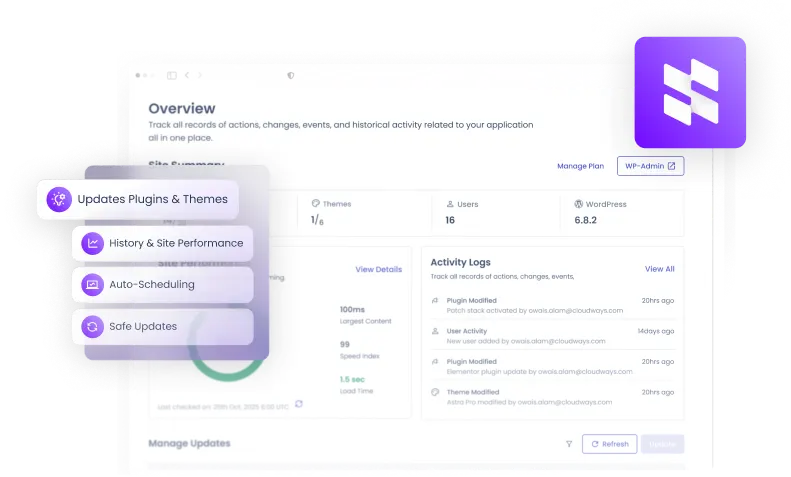
Save Hours Daily
Enterprise-Grade Security
Full Multi-Site Control
One Dashboard to Run Every WordPress Site You Own
Smart Update Engine
- Auto-detection of available updates
- Full backup before every update
- Auto rollback
- Post-update automatic cache clearing
- Selective update control
Advanced Testing
- Sandbox environment cloning
- Visual regression with AI screenshot comparison
- Customizable test configurations
Monitoring & Alerts
- PageSpeed Insights monitoring
- Detailed Activity Logs
- PHP error tracking
- Slack & email alert channels
- Detailed update history
Management Tools
- Centralized theme & plugin management
- User & role administration
- One-click SSO into WordPress Admin
- Bulk actions across sites
Automation & Scheduling
- Flexible scheduling
- Off-peak update windows
- Per-site or global schedules
- Flexible Quick and Safe Updates
- Critical updates automation
Compatibility
- Premium plugin support
- WordPress multisite compatible
- Native Cloudways platform integration
Seamless Upgrade
From SafeUpdates to
From SafeUpdates to
Site
Manager
Site Manager is the natural evolution of Safe Update. Everything you relied on is still here—plus powerful new tools for monitoring, user management, and multi-site operations.
Explore all features
Built for Teams That Work and
Dream in
WordPress
Agencies
Managing multiple client sites
Bulk updates, centralized dashboards, and automated safety nets save you 10+ hours a week. Your clients get reliability. You get your time back.

Developers
Automation + full control
Scheduled updates, visual regression tests, and detailed logs give you confidence to ship faster and maintain less.

Ecommerce
Maximum uptime for online stores
WooCommerce stores can't afford a broken update. That’s why updates are tested in sandbox environments before they are pushed to production.

Simple, Seamless Integration In Three Easy Steps
Detect
Updates are automatically detected across all your sites the moment they are available.
Test in Staging
Every update is applied to a sandboxed clone first, keeping your live site completely untouched.
Validate Visually
Before- and after-update screenshots are compared automatically to catch any visual regressions.
Deploy or Rollback
Tests pass? It goes live. Something looks off? It rolls back instantly, no action needed from you.
Why Site Manager?
Site Manager automates the work that keeps piling up, so your team stays focused on clients, not chores.
Growth stops when maintenance takes over.
Get added peace of mind with comprehensive on-demand scans of your applications as needed.
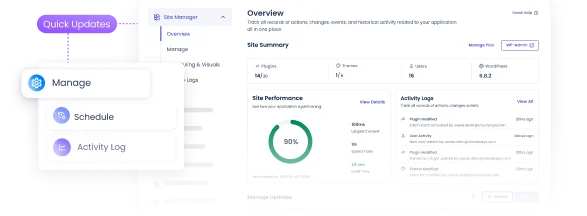
Win More Clients. Deliver at Scale.
Take on more clients without stretching your team. Promise faster, more reliable service and actually deliver it.

Save Time on Every Task
Automated updates, backups, and checks run in the background while you focus on moving your business forward.
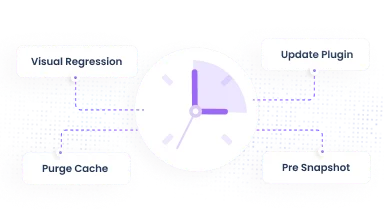
Smart Planning
Get complete visibility into previous scans & get a complete breakdown.

Secure Rollbacks
Restore files as needed, One by one or in bulk.

Simple Pricing. Clear Capabilities.
Start free with essential WordPress management and scale as you grow.
| Features |
Basic |
Pro |
|---|---|---|
| Centralized Dashboard | ||
| WordPress SSO | ||
| Plugin Management | ||
| Theme Management | ||
| User Management | ||
| Bulk Application Updates | ||
| Quick Updates | ||
| Safe Updates (Sandboxed Validation) | ||
| Auto Updates (Weekly) | ||
| Visual Regression Testing | ||
| Site Performance Monitoring | ||
| Update History | ||
| Activity Logs | ||
| Schedule History | ||
| Critical Updates Auto-application |
Pro Plan Pricing (per application)
-
Up to 5 Applications
$3
/app/month -
6+ Applications
$2
/app/month
Hear Directly From Our Customers
Every server you launch on Cloudways is backed by an optimized stack to ensure maximum performance.

The site is noticeably faster than it was, and our content site has come through traffic surges, a full PHP version upgrade and monthly plugin updates without disruption our customers would have felt.
Tobias Biberbach
Founder of Split My Fare

Adding another WordPress site doesn’t add another hour to my month the way it used to.
Richard Blackburn
RB Website Design

Site Manager is great and very helpful. It gives us a bird’s-eye view of the health of our apps without needing an external platform. It has been especially useful for temporarily disabling problematic plugins.
Claudia Kirkwood
Owner, Super Simple Websites

Site Manager has been a good experience for us so far with no major issues. The biggest advantage is that one failing plugin update doesn’t block the rest of the updates, which was a major limitation for us before. We are now gradually rolling it out across all new sites.
Jason Burgbacher
Technical Director, Tunnel Vision Design
Frequently Ask Question
What is Cloudways Site Manager?
Cloudways Site Manager is a WordPress site manager built into the Cloudways platform. It detects available updates and, on Pro, backs up each site and tests updates on a staging clone before they go live. It also monitors WordPress performance with PageSpeed Insights, tracks PHP errors, sends Slack or email alerts, and lets you manage plugins, themes and users across your connected sites from one WordPress management dashboard.
Which Cloudways plans and apps does Site Manager support?
Site Manager works with WordPress applications on Cloudways Flexible, including WooCommerce and WordPress Multisite. It does not manage other application types, and it is not currently available outside Flexible.
How do I activate Site Manager?
Activation takes three steps, and it is done per site, so you can start with one application and add others later. You can switch between Basic and Pro at any time.
Log in to your Cloudways account.
Go to Integrations > Add-ons.
Find Site Manager and activate it for each site you want to manage.
Is there a free plan, and what does Pro add?
Yes. Basic is the free plan, with limited features. It includes the centralized dashboard, WordPress SSO, plugin, theme and user management, and Quick Updates. Pro adds update testing on a staging clone, multi-page visual regression testing, weekly auto updates, performance monitoring, update and schedule history, Activity Logs, critical update auto-application and bulk plugin and theme updates. There is no free trial for Pro, but Basic lets you evaluate Site Manager first.
How much does Site Manager Pro cost?
Pro costs $3 per application per month for up to 5 applications, and $2 per application per month for 6 or more. It is billed per application (site), not per server. You can switch between Basic and Pro at any time.
How does Cloudways handle WordPress updates and maintenance?
Cloudways handles WordPress updates and maintenance through Site Manager, which replaced the older SafeUpdates tool. On Pro, it takes a full backup, applies each update to a temporary staging clone and compares screenshots of your homepage and up to 5 more pages with the live versions. If differences are flagged, the update is rolled back and never deployed. If the pages match, it goes live. There is no option to roll back after a successful deploy. Basic includes Quick Updates.
Can I schedule WordPress auto updates, and what if I update a plugin manually?
Yes, you can schedule updates per site or globally, including off-peak windows. Each site has one schedule, either Quick Updates or Safe Updates (the staging-tested option), not both, and selective updates let you exclude specific plugins or themes. Plugins you update by hand appear after the next scheduled sync or a manual refresh, not instantly. On Pro, Activity Logs are exportable and stored offsite with 90-day retention.
Can I manage multiple WordPress sites, users and clients from one dashboard?
Yes. The dashboard covers day-to-day WordPress site management across all your sites: plugins and themes, user creation and roles, and one-click SSO into each admin. Bulk plugin and theme updates are part of Pro, but uploading a new plugin or theme is done one site at a time. Clients can be given access to only their assigned sites. User management cannot currently be limited to specific team members, because granular restrictions are not available.
Is Site Manager suitable for WooCommerce stores?
Yes, Site Manager supports WooCommerce, and Pro's staging tests are designed for stores that cannot risk a broken update. Updates run on a staging clone first, screenshots of the live site and the clone are compared, and if differences are flagged the update is rolled back and never reaches your live store. Screenshot comparison flags visual changes, so keep testing the checkout flows that matter most to your business.
Will I know if an update fails or succeeds?
Yes. Site Manager sends notifications by email or Slack, and the activity log on Pro records what changed, when and on which site. Logs can be exported and are stored offsite with 90-day retention. PHP errors are tracked in the same dashboard.
Can I choose which plugins or themes to update?
Yes, selective updates allow you to exclude specific plugins or themes.
Which Premium WordPress plugins does Cloudways Site Manager support?
Site Manager supports premium WordPress plugins that are compatible with WP-CLI principles.
Can I find when a plugin was last updated?
Yes, this is available via Activity Logs on the Pro plan.
Can I export Activity Logs?
Yes, on Pro. Activity Logs can be exported for reporting and auditing, and they are stored offsite with 90-day retention.
Will updates disrupt my site while I work?
No. Updates run in the background, so you can keep working while they run.
What happens if an update breaks a site?
On Pro, each update is tested on a staging clone first. If the comparison flags differences, the update is rolled back automatically and never reaches your live site.
How can I monitor site performance after updates?
On Pro, performance monitoring uses PageSpeed Insights to track Core Web Vitals and TTFB over time, so you can see how updates affect speed across your sites.
Does Site Manager clear cache after updates?
Yes, both server-level and plugin caches are cleared automatically.
What is Visual Regression Testing (VRT)?
Visual regression testing compares screenshots of your live pages with the updated staging clone to flag visual differences. On Pro, it covers your homepage and up to 5 more pages. If differences are flagged, the update is rolled back and never deployed.
Ready to automate your WordPress management?
Join thousands of agencies who save hours every week